 TruePx
 Docs / Side panel
Audit tab
A launch checklist that checks itself: accessibility, security and privacy, speed, content and layout problems on the page, worst first, each with the elements involved and how to fix it.
Run an audit#
Open the side panel (0) and choose Audit. The audit runs on the page as it is in your tab, usually in a few seconds, and Re-run runs it again after you change something. The number on the tab counts the errors and warnings.
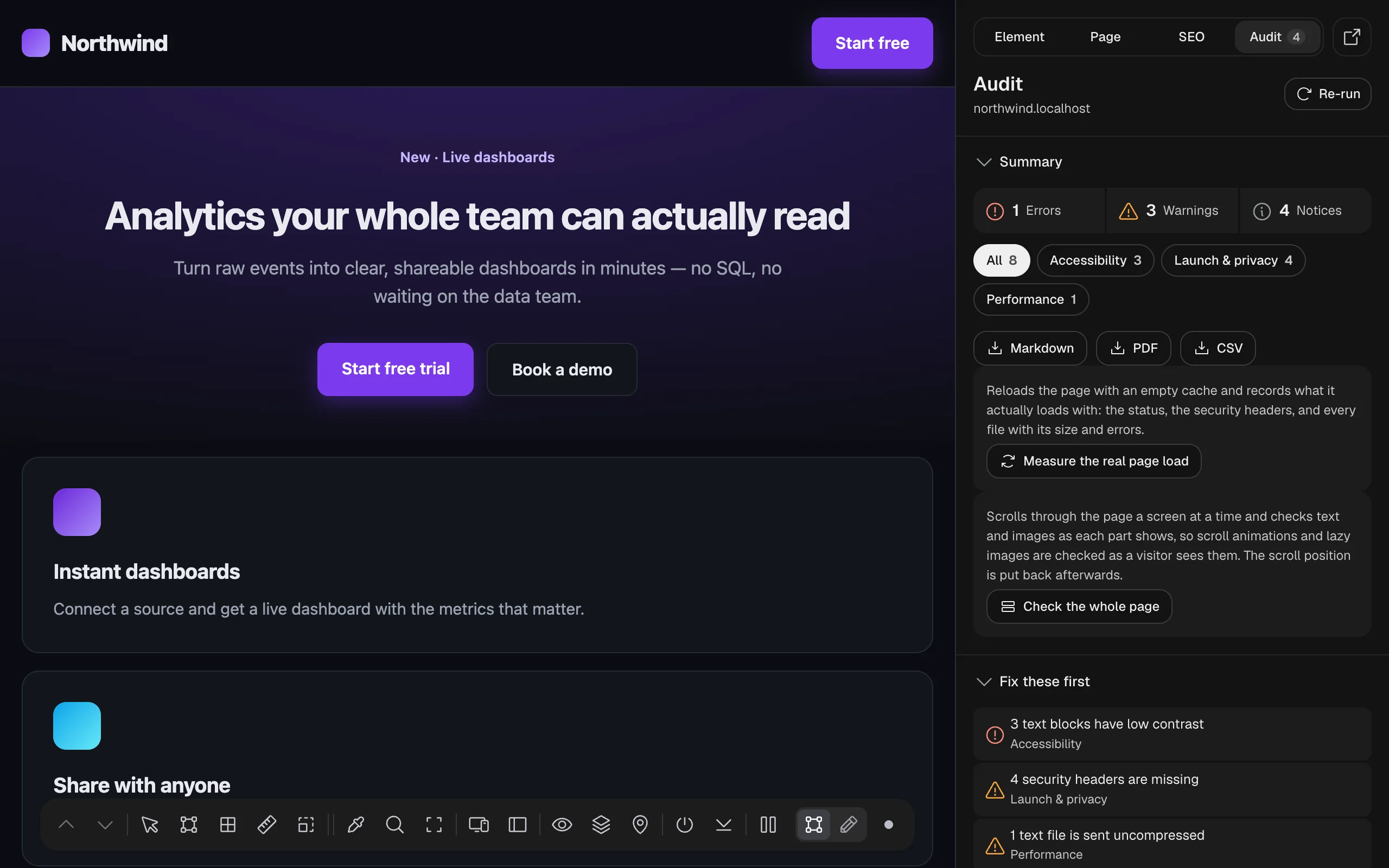
Issues use the same three severities as the SEO tab: Error, Warning and Notice. SEO issues stay in the SEO tab; the few that are also about accessibility (alt text, link text, headings, page language) appear in both, marked Also in the SEO tab.
Summary#
- Errors, Warnings, Notices: how many of each.
- Category chips (All, Accessibility, Launch & privacy, Performance, Content, Design & layout): show issues from one category. Categories with no issues are hidden.
- Markdown downloads the report as a
.mdfile; PDF opens a print-ready report you can save as PDF; CSV downloads it as a spreadsheet. Useful to hand to a developer or client. - Since the last check: after a re-run on the same page, how many issues were fixed, how many are new and how many are still open.
Measure the real page load#
Normally the audit reads what the browser already knows about this visit, and some things can’t be known that way: the exact response headers, and the size and status of files from other sites. Measure the real page load reloads the page with an empty cache and records what it actually loads: the status, the security headers, and every file with its size and any error. Performance and Launch & privacy issues then come from that load.
It needs access to the site (Chrome asks the first time), watches only this tab, keeps the record only while the browser is open, and never sends it anywhere.
Check the whole page#
A normal audit checks text contrast and images as they are right now, so parts that only appear when you scroll (fade-in animations, lazy-loaded images) may not be ready. Check the whole page scrolls through the page a screen at a time, lets each screen settle, checks the text and images as they show, then puts the scroll position back. Use it for long pages with scroll effects.
Fix these first#
The most serious issues, picked so each category gets a turn before any gets a second one. Click one to jump to it.
Working with an issue#
Click an issue to open it:
- The elements it’s about, with details (a size, a color ratio, a file name). Show scrolls to one and spotlights it on the page.
- How to fix: what’s wrong and what to change, in plain words.
- Copy for AI: copies the issue, its elements and the fix as a prompt for Claude, Cursor or another coding assistant.
- Ignore on this site: hides the issue on every page of this site, for problems you’ve decided to accept. Ignored issues are listed at the bottom (“Ignored on this site”), where Show again brings one back.
Accessibility#
Problems that make the page hard or impossible to use with a keyboard, a screen reader, low vision or color blindness. Text contrast is measured with axe-core, the engine behind Lighthouse. Text on a photo, gradient or overlay is measured from the pixels actually painted behind it: TruePx hides the text for a moment and reads the screenshot. Text over something that keeps moving (a video, a slideshow, an animation) is listed to check by eye, with the reason.
Tab order#
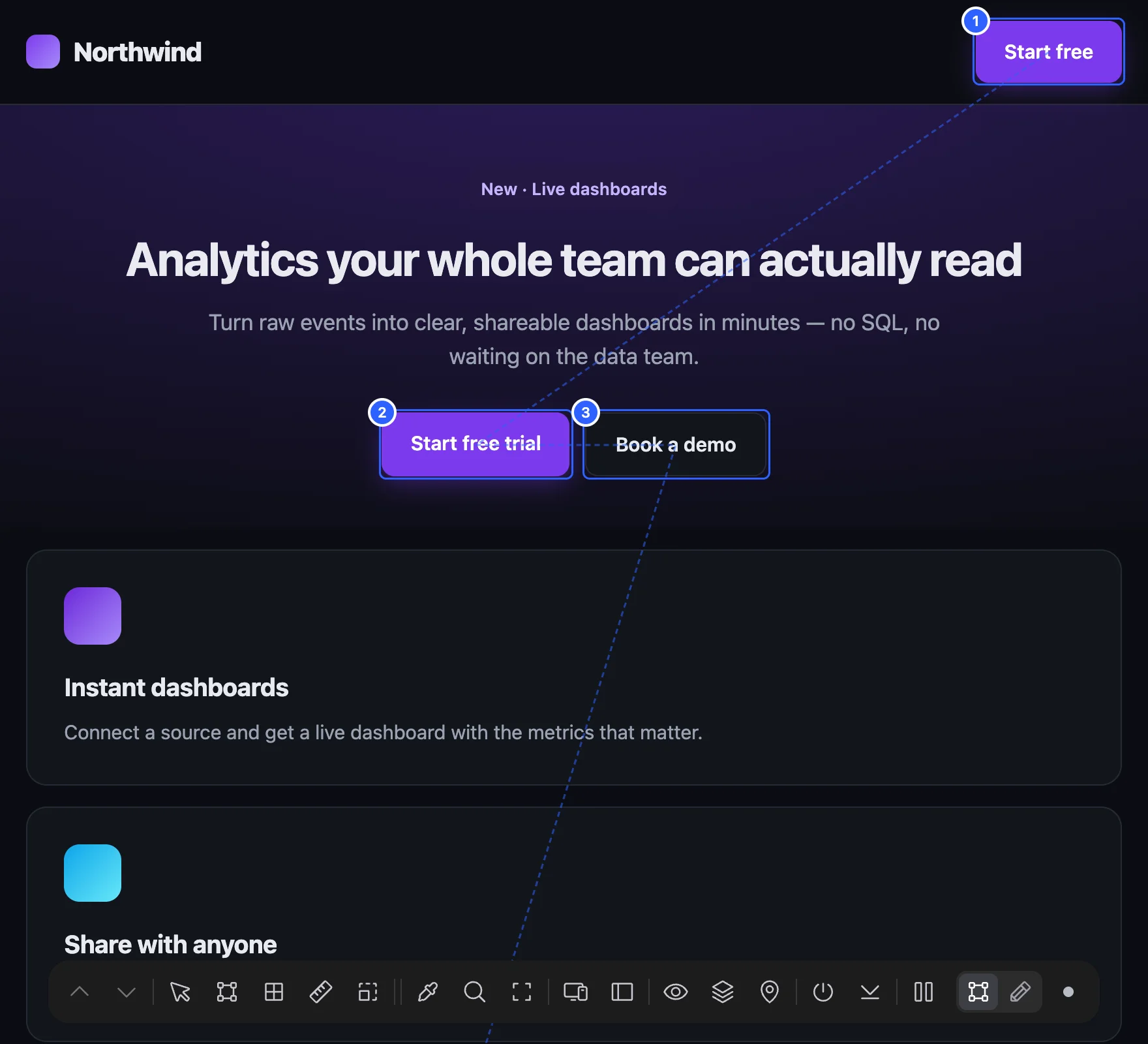
Show on the page numbers every stop the Tab key visits, in order, and joins them with a line, so you can spot jumps and controls the keyboard can’t reach. Stops with a positive tabindex (they jump ahead of everything else) are orange. Hide removes the numbers.
Also check yourself#
Some things only a person can judge. The list at the end of Accessibility reminds you: use the page with only the keyboard, zoom to 200%, try a screen reader on the main task, and turn on reduced motion.
Launch & privacy#
Things that are easy to forget before a site goes live: security headers, secrets left in the code, insecure forms and files, tracking that starts before consent, and missing legal links and favicon.
Performance#
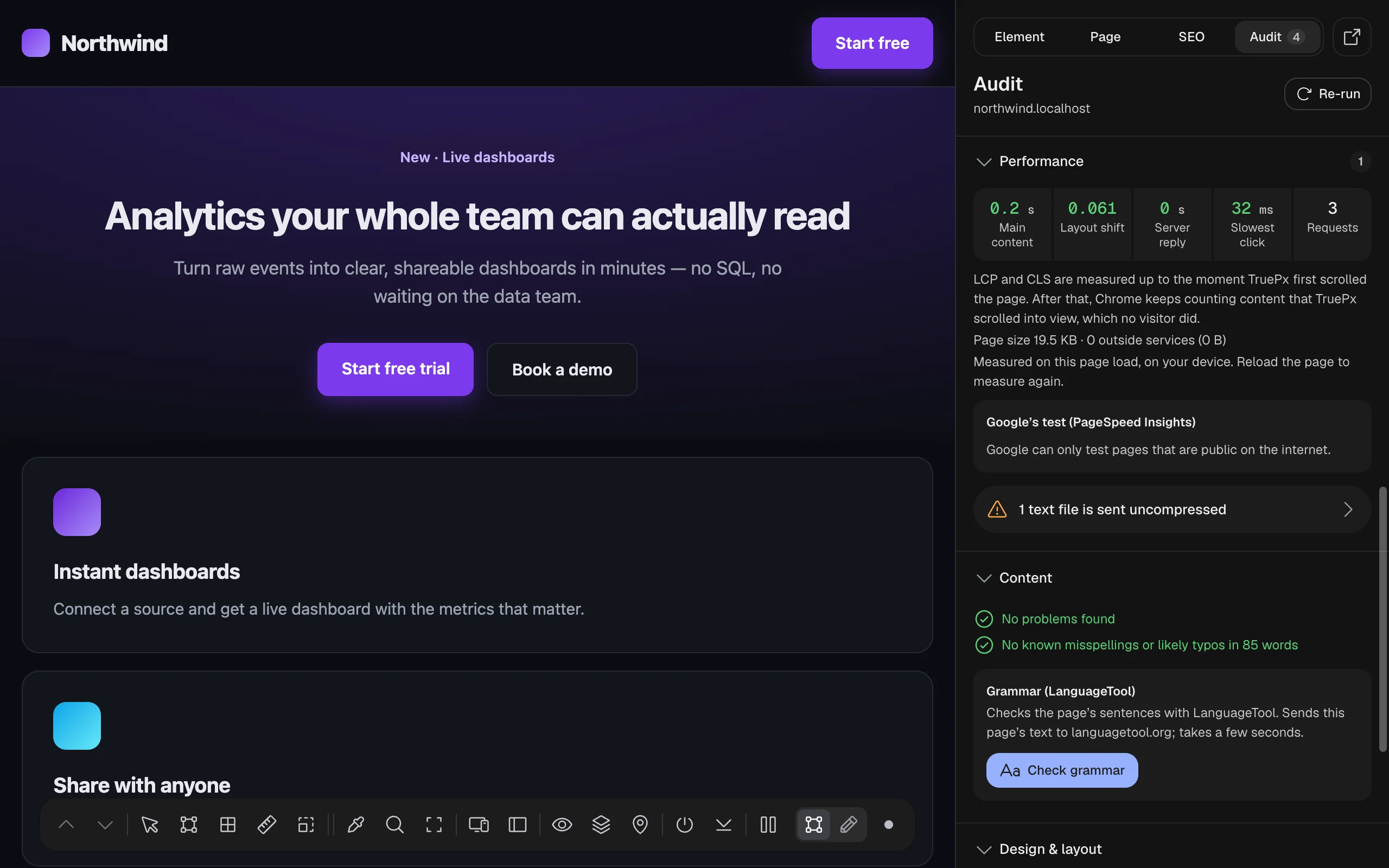
How fast the page loaded on this visit, measured in your browser:
| Number | What it is | Good |
|---|---|---|
| Main content | Largest Contentful Paint (LCP): when the biggest image or text block appeared. | 2.5 s or less |
| Layout shift | Cumulative Layout Shift (CLS): how much the page jumped while loading. | 0.1 or less |
| Server reply | Time to first byte (TTFB): how long the server took to start answering. | 0.8 s or less |
| Slowest click | Interaction to Next Paint (INP): the longest wait between a click or key press and the page responding, since TruePx started. | 200 ms or less |
| Requests | How many files the page loaded. |
To measure Slowest click: pause inspection (P), use the page (open menus, press buttons, switch tabs), then press Re-run. LCP and CLS are counted up to the moment TruePx first scrolls the page, because content it scrolls into view isn’t something a visitor did. If the page loaded in a background tab there’s no LCP; use Measure the real page load to time a load in front.
Under the numbers: the page size and the outside services it loaded (analytics, ads, chat, video…), named from the same dataset Lighthouse uses.
Google’s test (PageSpeed Insights)#
Run Google’s test runs Lighthouse on Google’s servers (mobile) and shows the score and lab numbers, plus what real Chrome users experienced on this page (or the whole site) over the last 28 days when Google has enough data. It sends the page’s address to Google and takes about 20 seconds. It only works for pages that are public on the internet. If Google’s free shared limit is used up for the day, paste your own free API key (the link explains how to get one); it’s saved in this browser only.
Content#
Unfinished or careless text: placeholder copy, typos, repeated words, stray spaces, links to a development server, broken images, an old copyright year, vague link text, empty paragraphs and text cut off by its box.
- Typos are checked on the page’s English text with a built-in dictionary, every time; nothing is sent anywhere. It reports known misspellings and rare words one letter away from a common one, and says how many words it checked.
- Grammar (LanguageTool) runs only when you click Check grammar. It sends the page’s full sentences (not menus or buttons) to languagetool.org and lists what it finds. Read each sentence before changing it.
Design & layout#
Things that look broken: something wider than the screen (the cause of a sideways scrollbar), fonts that failed to load or are faked, stretched images and blurry ones.
Other screen widths#
Check widths loads the page in the background at common phone, tablet and desktop widths (360, 768, 1024 and 1440 px) and just either side of each width the page’s CSS reacts to, up to nine widths, and reports where the layout breaks, for example where something starts to overflow. It doesn’t change your tab.
Design consistency#
Scan page looks for things that are almost the same but not quite, usually leftovers that should match:
- Button styles: buttons that differ slightly (padding, radius, font size), grouped by style, with how many use each.
- Heading drift: the same heading level shown at different sizes.
- Spacing off its step: margins and gaps that don’t fit the page’s own spacing scale (for example multiples of 8 px).
- Near-misses: edges that are almost aligned, off by 2 px or less.
Hidden elements and cookie-consent dialogs from vendors like Cookiebot or OneTrust aren’t counted, since they aren’t the site’s own design.
Every Audit check#
What each issue means. Titles are as TruePx shows them, with # standing for the number found on your page.
Accessibility checks#
| Issue | Severity | What it means and how to fix it |
|---|---|---|
| # text blocks have low contrast | Error | Text needs a contrast ratio of 4.5:1 with its background, or 3:1 for large text (24 px, or 18.5 px bold). Select one and use Fix all contrast issues in the Element tab. |
| # text blocks below the fold may have low contrast | Notice | A script or animation controls how this text looks (often a scroll effect), and TruePx couldn’t measure it on screen. Scroll to it and select it in the Element tab, or use Check the whole page. |
| # text blocks’ contrast couldn’t be measured | Notice | The colour behind the text can’t be worked out (a photo, a video, a moving background, or another layer on top). Each row says why. Check it with the color picker on the darkest and lightest spots behind the text. |
| Text contrast wasn’t checked | Notice | The contrast engine couldn’t run on this page. Run the audit again; if it keeps happening, the page may block extension scripts. |
| # form fields have no label | Error | Screen readers announce these as just “edit text”. Add a <label> (it can be visually hidden) or an aria-label; placeholder text isn’t a label. |
| # buttons have no name | Error | Icon-only buttons are announced as just “button”. Add an aria-label that says what it does. |
| # controls are hidden from screen readers but still focusable | Error | Tab lands on something hidden from screen readers (aria-hidden). Remove aria-hidden, or take it out of the tab order too. |
| Pinch-to-zoom is turned off | Error | People with low vision zoom to read. Remove user-scalable=no and maximum-scale from the viewport tag. |
| # buttons or links are too small to tap | Warning | Make links and buttons at least 24 × 24 px (44 × 44 is better on phones), or leave more space around them. |
| # controls show no focus ring for keyboard users | Warning | The CSS removes the outline when these get keyboard focus and adds nothing else, so keyboard users can’t see where they are. Add a visible :focus-visible style. |
| # elements act as buttons but can’t be reached by keyboard | Warning | An element acting as a button (role="button") can’t be focused. Use a real <button>, or add tabindex="0" and Enter/Space handling. |
| # ARIA references point at ids that don’t exist | Warning | aria-labelledby, aria-describedby or aria-controls names an id that isn’t on the page, so the label is silently lost. |
| # menus have no menu items | Warning | Screen readers expect an app-style menu with menuitem children. For site navigation, drop the role and use <nav> with links. |
| # videos or audio clips play sound by themselves | Warning | Sound that starts on its own talks over screen readers. Mute autoplaying media or let visitors press play. |
| Images without alt text · Links without text · Empty headings · Skipped heading levels · No page language | see SEO | Shared with the SEO tab; see the SEO checks. |
Launch & privacy checks#
| Issue | Severity | What it means and how to fix it |
|---|---|---|
| # security headers are missing | Warning or Notice | Headers such as Content-Security-Policy, Strict-Transport-Security or X-Content-Type-Options aren’t set. Set them on your server, CDN or host, one at a time, and check the site still works. |
| Security headers couldn’t be checked | Notice | The server’s response couldn’t be read. Use Measure the real page load to read the headers the page loaded with. |
| The server says which software version it runs | Notice | Attackers look for known holes in specific versions. Turn off the version in the Server or X-Powered-By header. |
| # files load over insecure http:// | Error | Browsers block or warn about them, so they may not show. Change them to https://. |
| # forms send data over insecure http:// | Error | The form’s action is an http:// address. Point it at https://. |
| # secret keys are visible in the page’s scripts | Error | A private key (for example Stripe, AWS, GitHub or OpenAI) is in the page’s code where anyone can copy it. Revoke it now, make a new one, and keep it on the server. |
| # trackers run before the visitor answers the cookie banner | Error | Analytics or ad tools load before a visitor said yes, which EU and UK rules don’t allow. Load them only after consent, or use Google Consent Mode with “denied” by default. |
| # trackers run and no cookie banner was found | Notice | Analytics or ad tools run and no consent banner was found. If you already answered a banner on this site, ignore this. |
| No link to a privacy policy | Warning or Notice | Sites that collect anything (a form, analytics, cookies) usually need one, linked in the footer. |
| No link to terms or legal notice | Notice | Shops, apps and EU businesses usually need terms of service or a legal notice (Impressum). |
| No favicon | Warning | Tabs, bookmarks and Google’s mobile results show a blank icon. Add <link rel="icon"> and a 180 × 180 apple-touch-icon. |
Performance checks#
| Issue | Severity | What it means and how to fix it |
|---|---|---|
| Main content took … to appear (LCP) | Warning or Error over 4 s | Make the main element arrive sooner: a fast server, the image in the HTML (not added by scripts), a modern format at the size it’s shown, fewer render-blocking files. |
| The main image is lazy-loaded | Error | Lazy loading delays the biggest image on screen. Remove loading="lazy" from it and add fetchpriority="high". |
| The main image has no fetchpriority="high" | Notice | Add it so the browser downloads that image first. |
| The layout jumped while loading (CLS) | Warning or Error over 0.25 | Give images and embeds width and height, reserve space for banners and ads, and use a size-matched fallback for web fonts. The elements that moved are listed. |
| A click took … to show a response (INP) | Warning or Error over 500 ms | The page was busy running JavaScript. Split long work, do less on each click, or move heavy work off the main thread. The scripts that were running are listed. |
| The server took … to start answering | Warning or Error over 1.8 s | Everything waits for this. Cache the page (CDN or server cache) and look at slow database queries or cold starts. |
| # scripts block the first paint | Warning | The page stays blank until they download and run. Add defer (or async), or move them to the end of <body>. |
| # stylesheets block the first paint | Notice | Several separate stylesheets delay the first paint. Combine them where you can; on hosted platforms (Webflow, Wix, Squarespace…) TruePx says when they can’t be combined from the site. |
| # text files are sent uncompressed | Warning | Turn on gzip or Brotli on the server or CDN; HTML, CSS and JavaScript usually shrink by 70% or more. |
| # font files are loaded | Notice | Each weight and style is another download. Drop unused weights, use a variable font, or subset. |
| The page downloaded … in … requests | Notice or Warning over 6 MB | Heavy pages are slow on phones and mobile data. Start with the largest images and scripts. |
| # files the page asked for failed to load | Warning or Error | Requests got an error instead of the file. A failed script or stylesheet means part of the page doesn’t work or look right. |
| # files have integrity attributes that don’t work | Warning or Error | An integrity hash is wrong or missing crossorigin, so the browser may block the file. Use the hash your CDN gives. |
| # outside services were loaded | Notice | Ads, analytics, chat and video tools, named by company. Keep the ones you use; load the rest later. |
| # images have no width and height | Warning or Notice | The browser can’t reserve room for them, so content moves when they load (a warning when it actually moved). Add width and height attributes, or aspect-ratio. |
| # images have far more pixels than they are shown at | Warning | Each file has at least 4× the pixels your screen shows at its displayed size. Resize it, or serve sizes with srcset and sizes. |
| # images use older formats | Notice | AVIF or WebP files are usually 25–50% smaller than JPEG or PNG at the same quality. The format is read from the file, not its name. |
| # images haven’t loaded yet, so they weren’t checked | Notice | These hadn’t arrived when the audit ran (lazy images below the fold, carousel slides). Check the whole page loads them, or show them and re-run. |
Content checks#
| Issue | Severity | What it means and how to fix it |
|---|---|---|
| # places still have placeholder text | Error | Lorem ipsum, TODO or “[insert …]” left on the page. Replace it with the real copy. |
| # links point to local or staging addresses | Error | Addresses like localhost or a staging server only work for you. Switch them to the live address. |
| # images failed to load | Error | Visitors see a broken-image icon. Fix the path or upload the file. |
| # possible typos | Warning | Known misspellings, or rare words one letter away from a common one. Fix slips; ignore names and product words. |
| # possible grammar mistakes | Warning | Found by LanguageTool after you click Check grammar. Each row says why. |
| # repeated words | Warning | The same word twice in a row (“the the”). Delete one. |
| # pieces of text are cut off by their boxes | Warning | A box is smaller than its text and hides the rest. Let it grow, or shorten the text; translations make this worse. |
| # visible extra spaces | Notice | Double spaces, or a space before a comma or full stop. |
| # page titles or descriptions have stray spaces | Notice | Leading, trailing or double spaces show up in search results and share previews. |
| The copyright year says … | Notice | An old year makes the site look abandoned. Update it, or print the current year from the template. |
| # links only say “click here” or “read more” | Notice | Several links say the same thing (“Read more”) but go to different places. Say where each goes. |
| # empty paragraphs add space | Notice | Often from pressing Enter twice in a CMS. Delete them and use the design’s spacing. |
Design & layout checks#
| Issue | Severity | What it means and how to fix it |
|---|---|---|
| # elements are wider than the screen | Warning | These elements stick out past the window and cause the sideways scrollbar, worst on phones. Each row says what to change. |
| # web fonts failed to load, so fallbacks are shown | Error | An @font-face file returned an error, was blocked, or is in the wrong format, so visitors see a system font. |
| # bold or italic styles are faked by the browser | Notice | No font file exists for that weight or style, so the browser smears or slants the regular one. Load the real file. |
| # images are stretched or squashed | Warning | The box’s shape differs from the file’s, so the picture is distorted. Use object-fit: cover or contain, or match the ratio. |
| # images look blurry on this screen | Notice | Shown more than 25% larger than the file on your screen. Export a bigger file, or serve one with srcset. |
| This page has over 20,000 elements: # checks looked at the first 20,000 | Notice | On a page with over 20,000 elements, the named checks looked at the first 20,000, so problems further down may be missing. |