 TruePx
 Docs / Side panel
SEO tab
How the page looks in Google, every SEO problem on it with how to fix it, broken links, the heading outline, structured data, language versions and share previews, in one tab.
Open it#
Open the side panel (0) and choose SEO. It checks the page as soon as it opens; Refresh checks it again after you change something. The number on the tab counts the errors and warnings found.
Besides reading the page in your tab, the SEO tab asks the site for a few things a search engine would: the page again (to see the status code, the X-Robots-Tag header and the HTML before JavaScript runs), /robots.txt, the sitemap, the share image, and one made-up address to see whether missing pages answer 404. These requests go only to the site you’re checking. See what TruePx sends.
Search Preview#
The page as a Google result: address, title and description. Under it, a meter for each shows its length in characters and in pixels, because Google cuts titles and descriptions by width, not by character count. A title over about 600 px or a description over about 920 px is marked Too long, with where Google would cut it.
No meta description? The preview says so: Google will pick text from the page instead.
SEO Issues#
Every problem found, most serious first. Each row has a severity icon:
- Error stops the page from being found, shown or shared properly. Fix these.
- Warning hurts search results or accessibility. Fix when you can.
- Notice is worth knowing; often fine, sometimes a quick win.
Click a row to open it. You get the elements it’s about (click Show to scroll to one and spotlight it on the page, or open a link in a new tab), a How to fix explanation, and Copy for AI, which copies the issue, its elements and the fix as a prompt for Claude, Cursor or another coding assistant.
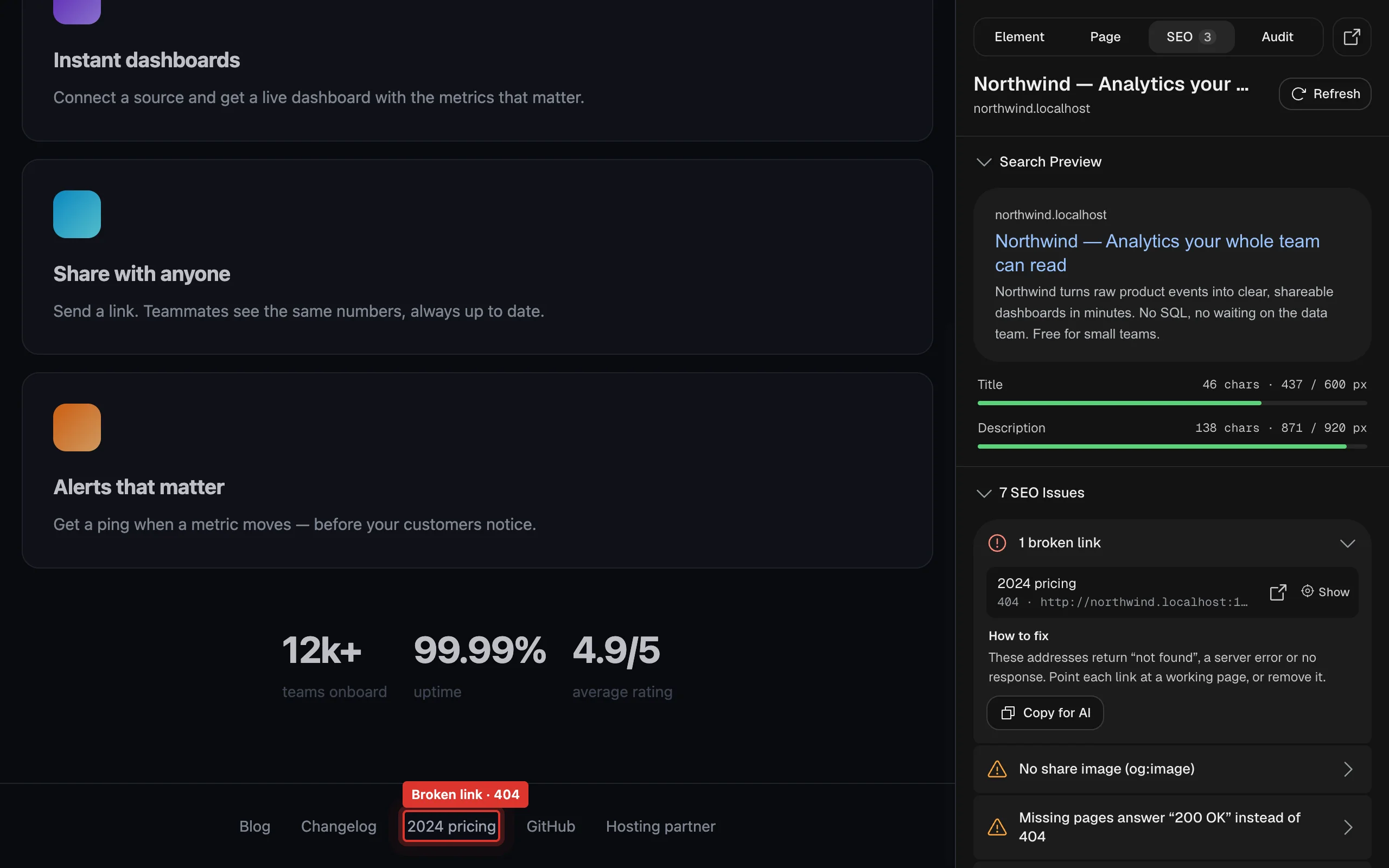
Links without text, links that go nowhere and empty headings inside content that’s hidden right now (a closed menu, an inactive tab) are reported separately as notices, so they don’t inflate the count.
Check links#
Links aren’t checked until you ask, because it means visiting every address on the page. Click Check links: TruePx requests each unique link (up to 500), first with a quick HEAD request, then with a normal request if that fails, and waits up to 12 seconds for each. The result says how many addresses were checked, broken, redirecting or had other problems, and adds them to the issues list. Check again repeats it.
Checking links on other sites needs Chrome’s permission to visit them. The first time, Chrome asks; if you decline, the check explains how to allow it.
Overview#
The page’s key facts: URL, HTTP Status, Canonical address, Robots rules (or “index, follow (default)”), the X-Robots-Tag header if the server sends one, Language, word count, and the author, publisher and keywords tags when present.
Headings#
How many headings of each level (H1 to H6) the page has, and its outline as a search engine reads it: each heading, indented by level. Empty headings show as “(empty)”. A good page has one H1 and goes down one level at a time.
Links#
Every link on the page with its text and address. Filter by All, Internal, External, Nofollow (links marked nofollow, sponsored or ugc) and, after a link check, Problems.
- Highlight nofollow outlines nofollow links on the page itself.
- Export CSV downloads the list (address, text, rel, internal or external, and the status after a link check) for a spreadsheet.
Images#
How many images the page has and which have no alt text. Click one to find it on the page. When every image has alt text but some are marked decorative (alt="", which screen readers skip), those are listed for you to review: make sure none of them carries information, such as a product photo, a chart, a linked logo or text in an image.
Structured Data#
Every JSON-LD block on the page, one card per item (for example Organization, SoftwareApplication, Product, Article). Open a card to see its properties as a tree, and copy the JSON. For types that can show as a Google rich result, TruePx checks the required properties and says either “Has every property Google’s … rich result requires” or which ones are missing. A block that isn’t valid JSON is marked Invalid JSON.
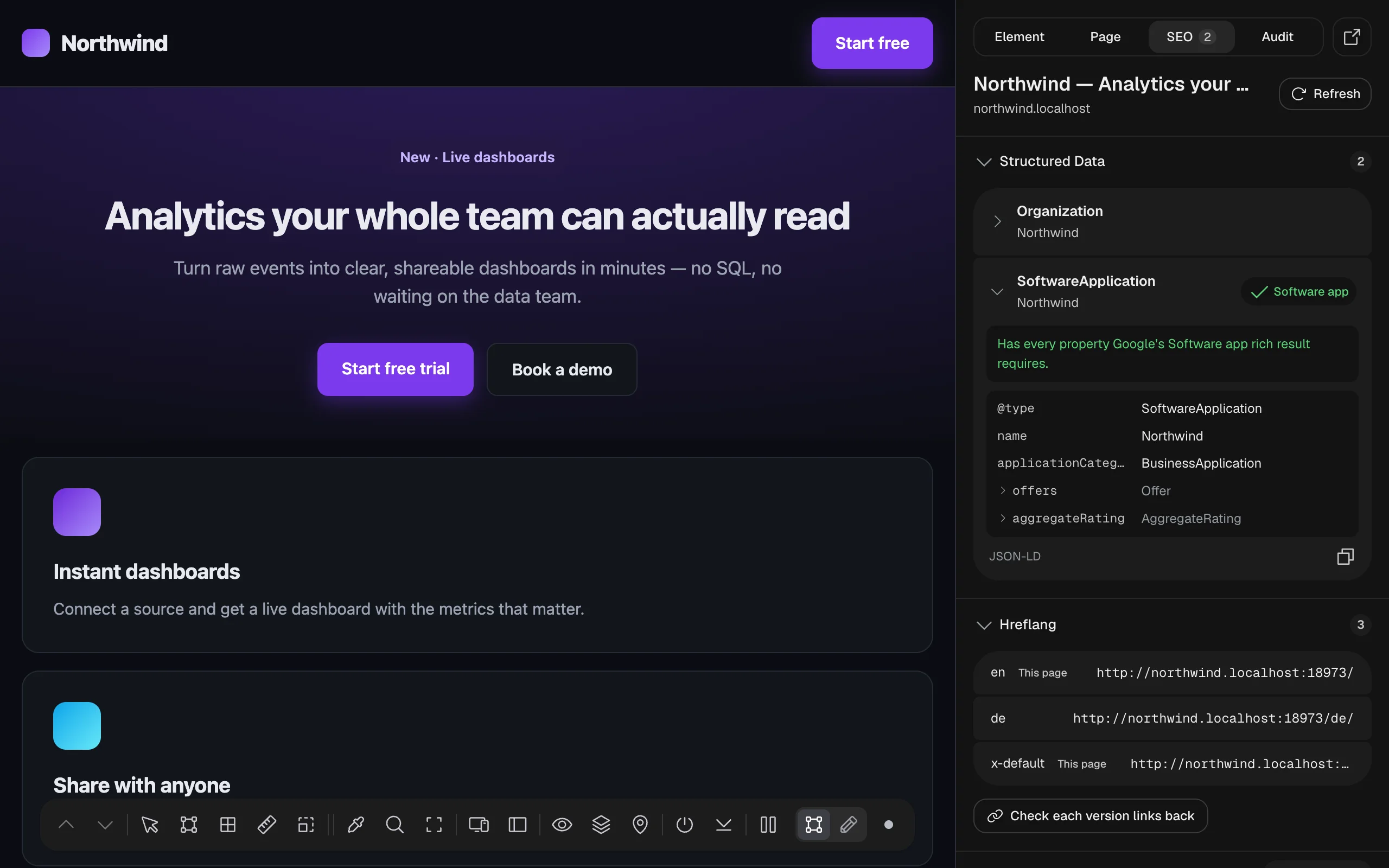
To confirm a result in Google’s own tool, use Rich Results Test in Quick Links.
Hreflang (language versions)#
Shown when the page lists other language or region versions of itself with hreflang. Each version shows its language code and address; This page marks the current one.
Google only uses a pair of versions when each links back to the other. Click Check each version links back: TruePx loads every listed version and reads its HTML and HTTP Link header. Each version then says Links back, Doesn’t link back: Google ignores this pair, Redirects to … (point hreflang at the final address) or Couldn’t load it.
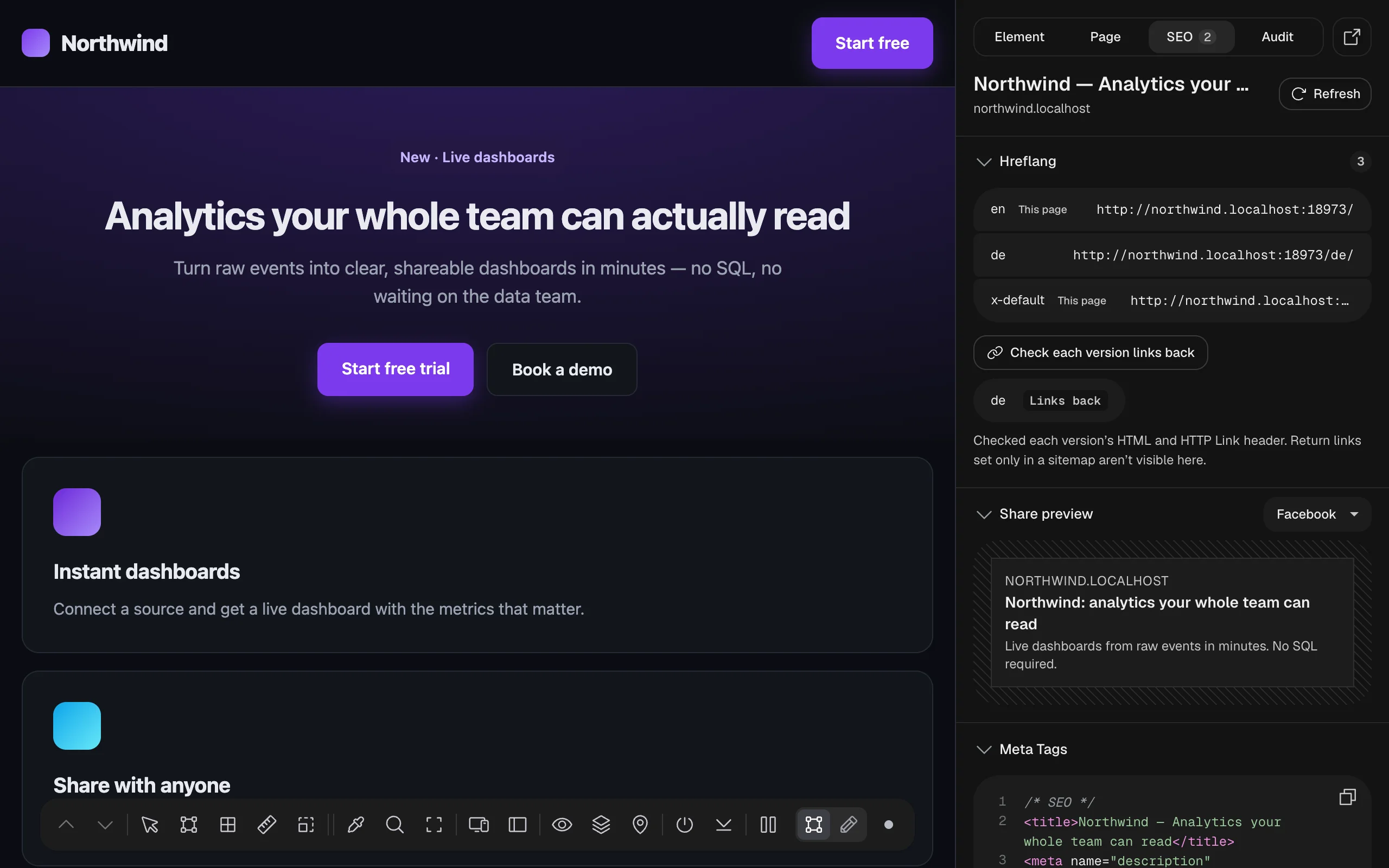
Return links declared only in a sitemap can’t be seen this way; the result says so.
Share preview#
How a link to the page looks when shared on Facebook, X or LinkedIn (pick one from the menu): the card with its image, title, description and site, built from the page’s Open Graph and Twitter tags. The image only shows if it loads and is big enough to be used.
Meta Tags#
All the page’s meta tags as code, grouped into SEO, Open Graph and Twitter, with a copy button.
Quick Links#
One click to the tools you’d open next, for this page or site: robots.txt, sitemap.xml, PageSpeed Insights, Google’s Rich Results Test, the Schema Validator, a site: search on Google, and the Wayback Machine. They open in a new tab.
Every SEO check#
What each issue means. Titles are as TruePx shows them, with # standing for the number found on your page.
Title, description and headings#
| Issue | Severity | What it means and how to fix it |
|---|---|---|
| No <title> tag | Error | The page has no title. Give it one of around 50–60 characters; it’s the headline of the search result. |
| Title may be cut off in Google results | Notice | Desktop results show about 600 px of a title and cut the rest with “…”. Put the key words first, or trim it to roughly 50–60 characters. |
| Title under 30 characters | Notice | A short title says little in search results; roughly 50–60 characters is ideal. |
| No meta description | Error | Write a summary of about 70–155 characters; search engines often show it under the title. |
| Meta description under 70 characters | Notice | Expand it to about 120–155 characters so the snippet says more. |
| Meta description may be cut off in Google results | Notice | Desktop results show about 920 px (roughly 150–160 characters). Put the important part first. |
| No <h1> heading | Warning | Add a single <h1> that names the page’s topic. |
| # <h1> headings found | Warning | Keep one <h1> and turn the rest into <h2> or lower. |
| Heading level skipped / # skipped heading levels | Notice | Go down one level at a time (h2 → h3, not h2 → h4) so the outline reads as a clear structure. |
| # empty headings | Warning | A heading with no text adds a blank entry to the outline. Give it text, or use a <div> or <p> if it’s only for styling. |
Indexing and the server’s answer#
| Issue | Severity | What it means and how to fix it |
|---|---|---|
| Page blocks indexing (noindex) | Error | A robots meta tag tells search engines to skip the page. Remove noindex if it should be findable. |
| HTTP header blocks indexing (noindex) | Error | The server sends X-Robots-Tag: noindex, so search engines skip the page even though the HTML allows it. Remove it from the server or CDN settings. |
| Page returns status … | Error | The address answers with an error status (for example 404 or 500), and search engines drop such pages. Make it return 200. |
| No canonical URL | Notice | Add <link rel="canonical" href="…"> pointing at this page’s main address. |
| Canonical points to another page | Notice | Search engines will index that address instead. Fine for duplicates; on the main page, point it at this URL. |
| # tags are given conflicting values | Warning or Notice | A tag that should appear once (title, description, canonical, og:title, og:url, twitter:…) appears with different values, often one from the site builder and one from an SEO plugin. Remove the extras. |
| # important parts only appear after JavaScript runs | Error or Warning | Compares the HTML the server sends with the page after scripts run: the title, meta description, canonical link, H1 or most of the text is added by JavaScript, or a noindex in the HTML is removed by it. Google may render scripts late or not at all, and other search and AI crawlers often never do. Render these on the server (SSR or prerendering). A missing title, a removed noindex or mostly script-added text makes it an error. |
| The HTML before JavaScript and the X-Robots-Tag header couldn’t be checked | Notice | The site answered TruePx’s second request differently (a bot check, a login or an error). Check the page in Google Search Console’s URL Inspection to see what Google gets. |
| This is a bot check, not the site’s page | Error | A service like Cloudflare showed a challenge instead of the page, so nothing on it was checked. Complete it (or open the page in a normal window), then check again. It’s the only issue shown in that case. |
| No viewport meta tag | Error | Phones will show the desktop layout, shrunk. Add <meta name="viewport" content="width=device-width, initial-scale=1">. |
| <html> has no lang | Warning | Set the page’s language, for example <html lang="en">, for screen readers and search engines. |
Links and images#
| Issue | Severity | What it means and how to fix it |
|---|---|---|
| # broken links | Error | After Check links: these addresses answer “not found”, a server error or nothing. Point each at a working page, or remove it. |
| # links returned errors | Warning | The server answered with an error code or took over 12 seconds. Open the link to confirm, then fix or replace it. |
| # links redirect | Notice | Link straight to the final address; every redirect is an extra hop for visitors and search engines. |
| # links could not be verified | Notice | These sites answered 401, 403 or 429 to the check. Open them to confirm they work. |
| # links without text | Warning | Give every link visible text, an aria-label, or an image with alt text, so search engines and screen readers know where it goes. |
| # links go nowhere | Notice | href="#" and javascript: links can’t be followed. Give each a real address, or use a <button> for actions. |
| # jump links point to missing sections | Warning | Nothing on the page has the id the link jumps to. Add the id to the right section, or correct the link. |
| # links have an address in their rel attribute | Warning | rel takes keywords (nofollow, sponsored, ugc, noopener), not a URL, so a nofollow meant here isn’t applied. Put the address in href. |
| # images without alt text | Warning | Describe each image in an alt attribute; use alt="" for purely decorative ones. |
Structured data and language versions#
| Issue | Severity | What it means and how to fix it |
|---|---|---|
| # structured data blocks have JSON errors | Warning | Search engines ignore JSON-LD that doesn’t parse. Fix the syntax, then confirm in the Rich Results Test. |
| Structured data has an HTML code in its text | Notice | Inside JSON-LD nothing is decoded, so Buyer's is read literally. Write the character itself. |
| Structured data names this page differently from its title | Notice | The name shares no words with the title or H1, which usually means it was copied from another page’s template. Make it describe this page. |
| hreflang does not include this page | Warning | Each language version should list itself as well as the others. |
| No x-default hreflang | Notice | Add hreflang="x-default" for visitors whose language has no version. |
Sharing and site files#
| Issue | Severity | What it means and how to fix it |
|---|---|---|
| No share image (og:image) | Warning | Shared links show a plain box or a random image. Add og:image at 1200 × 630 px. |
| The share image address isn’t a full URL | Warning | Most platforms ignore a relative og:image. Use the full address starting with https://. |
| The share image doesn’t load | Error | The address returns an error or isn’t an image, so shared links show no picture. |
| The share image is only … px | Warning | Small images show as a thumbnail or not at all. Use 1200 × 630 px (at least 600 × 315). |
| The share image is … px, so platforms will crop it | Notice | Large previews are 1.91:1. Use 1200 × 630 px and keep text away from the edges. |
| No share title (og:title) | Notice | Platforms fall back to the page title. Add og:title with the headline you want people to see. |
| No share description (og:description) | Notice | Some platforms show no text under the link without it. Add one or two sentences. |
| No robots.txt | Notice | Not required, but crawlers look there for your sitemap. Add one with a Sitemap: line. |
| robots.txt blocks the whole site | Error | User-agent: * with Disallow: / tells every search engine to stay out, often left over from a staging site. Remove it before launch. |
| No sitemap found | Notice | A sitemap helps search engines find new pages. Generate /sitemap.xml and list it in robots.txt and Search Console. |
| Missing pages answer “200 OK” instead of 404 (or redirect to the home page) | Warning | A made-up address on the site didn’t return 404. Search engines treat such pages as real (“soft 404”) and broken links never show up. Return status 404 with a helpful not-found page. |